





I used to think about API authorization too early. I would start choosing how to secure an API before properly asking who was going to call it.
Some of the options I considered to secure my starter kit were:
- Cognito User Pool (M2M)
- Lambda authorizer
- Just use API keys
All the above are valid options and none are necessarily wrong approaches, except for API keys.
However, should every API have M2M authentication by default?
Or, should all backend systems have a dedicated authorizer?
Convention shouldn’t choose the authentication model before you know the caller.
I had fallen into a habit of treating M2M authentication as the default starting point for APIs. While working on my .NET on AWS Starter Kit, I went up and down trying to force it in.
Ask The Right Question First
Before getting too excited about techs such as AWS Cognito, Lambda Authorizer or even Azure App Registration, you must ask who would call my API before you commit to an authentication model. If you cannot answer this question ahead of time, you must go back to your drawing board.
Boring? Unexciting? It’s the right question and a defining one that can change how you need to protect the API.
Would you choose M2M as the default authentication model for requests being made on behalf of interactive users simply because the system happens to have an API?
Would you implement a simple API key for an API whose endpoints must be protected by roles?
What about BFF? Would you implement one for an API that is only used internally by other APIs? I mean, how would you even implement it? The last F stands for Frontend! Is there one?
I realised I was choosing the authentication model before properly defining who would call the API.
Picking the Technology Too Early
Adding an authentication and authorization module to my .NET on AWS Starter Kit was one of the features I wanted to get done properly. And I was aiming to do so before closing the doors on any additional features to prevent the repo growing too big.
Funny enough, over-engineering is sometimes part of my game. Achieving and appreciating simplicity does not come so easily for me without over-engineering first.
My over-engineering journey began with the dilemma between AWS Cognito User Pool and Identity Pool.
I could not effectively choose either. I didn’t yet have an identity model that justified introducing Cognito, such as human users, external machine clients, AWS workloads or something else.
I delved a bit deeper and studied AWS API Gateway documentation and ways of securing it. Guess what? I stumbled across another interesting approach; Lambda authorizer. I reached for a Lambda authorizer before I had a requirement that justified custom authorization logic. A Lambda authorizer is useful when you need custom authorization logic or control over how the decision is made.
What about API keys? I did think about it to make life easier. However, in API Gateway, API keys have their own place. They mustn’t be used for authentication or authorization mechanism.
No matter how many other mechanisms or approaches you find, you cannot effectively pick one if you don’t know how your system is going to be consumed.
Why I Chose IAM Authorization
My starter kit already assumes AWS. It already uses CDK and deploys AWS resources. Therefore, supporting an AWS-native caller identity as the default access model avoids introducing a separate user directory or OAuth server when the kit knows nothing about the final application’s users. So it’s a win. And no one is going to use my kit to deploy to Azure!
Implementing IAM Authorization in CDK is not exceptionally hard, although it does require careful implementation.
Note: IAM is my Starter Kit’s default. It is not my answer for every API built from the Starter Kit.
The IAM and SigV4 Details That Matter
Let’s start with this line:
SigV4 signs a request, not merely a user’s AWS credentials.
Path, HTTP method, query string, signed headers and other canonical-request details matter.
Possessing AWS credentials and producing a SigV4 signature doesn’t guarantee you could call the IAM-protected API. You must understand what identity is actually making the request, what permissions that identity has, and why assuming the role changes that identity. The source user’s credentials are not sufficient when execute-api:Invoke belongs to the dedicated invocation role.
Let’s take a look at some examples:
Example 1:
The role’s policy statement in which the permissions are defined will look something like the following. It will say what the resulting role session can do. The following policy grants execute-api:Invoke on the specified API Gateway resource ARN:
{
    "Version": "2012-10-17",
    "Statement": [
        {
            "Action": "execute-api:Invoke",
            "Resource": "arn:{aws_partition}:execute-api:{aws_region}:{aws_accountId}:{api_id}/{stage}/{HttpMethod}/resource_path/*",
            "Effect": "Allow",
            "Sid": "AllowGetPersonDetails"
        }
    ]
}
PS. This statement is inside the invocation role’s permissions policy. Described blow.
And the role trust policy will look something like the following. The role’s trust policy (as shown below) defines who - Principal - can assume it while its permissions policy (above) defines what can be done with it:
{
    "Version": "2012-10-17",
    "Statement": [
        {
            "Effect": "Allow",
            "Principal": {
                "AWS": "arn:aws:iam::{aws_accountId}:user/{username}"
            },
            "Action": "sts:AssumeRole"
        }
    ]
}
Once the role is successfully assumed by a principal, STS returns a new temporary credential set. These new credentials represent the assumed-role session. AWS credentials identify a principal. They don’t grant AWS access universally.
Example 2:
Below is a simplified version of the code you need to get the assume role response and to sign the request:
//Create STS client
using var stsClient = new AmazonSecurityTokenServiceClient(
    sourceCredentials,
    RegionEndpoint.EUWest1);

//Assume Role request/response
var assumeRoleResponse = await stsClient.AssumeRoleAsync(
    new AssumeRoleRequest
    {
        RoleArn = "role_arn",
        RoleSessionName = "an_id_for_this_session"
    },
    CancellationToken.None);

//SigV4 signing request/result
var awsSigningResult = await AWSSigV4Signer.SignAsync(new AWSSigningRequest
{
    HttpMethod = HttpMethod.Get,
    RequestUri = endpointUri,
    Headers =
    {
        { "x-api-key", "api_key" }
    }
}, new AWSSigV4Parameters
{
    Credentials = assumeRoleResponse.Credentials,
    Region = RegionEndpoint.EUWest1,
    Service = "execute-api"
}, CancellationToken.None);
What is the x-api-key header doing there? My Starter Kit happens to use and configure usage plans for throttling requests. The API key is used to identify usage for that plan and apply its throttling/quota settings. It’s not designed for authentication or authorization. The x-api-key header has to be in the request because the API method (should it be configured to require an API key) requires it as part of the usage plan.
Note:
AssumeRoleAsyncchanges which AWS identity the request will represent.SignAsyncthen proves that identity for one specific HTTP request.
The mental model is like this:
AssumeRoleAsync: who am I acting as?AWSSigV4Signer.SignAsync: Can I cryptographically prove that this identity signed this exact request?- Then API Gateway/IAM answers the third question: Is this identity allowed to invoke this API resource?
The new credential set consists of Access Key Id, Secret Access Key, and Session Token. The Session Token is an opaque value issued by STS that belongs to that temporary AWS session. It is part of AWS’s temporary-session credential set, and it must travel with the access key and secret key returned by STS. The SigV4 signer includes that token when it signs using the temporary credentials.
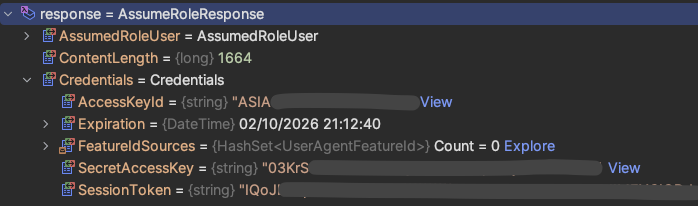
Note: Do not assume role, sign the request in .NET, and then copy the
AWSSigningResultdetails into the Postman request. SigV4 signs the actual HTTP request, so signing one request and sending a materially different one can causeSignatureDoesNotMatch. Let Postman sign the request Postman is actually going to send; Authorization tab -> AWS Signature from Auth type dropdown.
What I’d Do Differently Now
From now on, I would define the callers and trust boundaries first. Then I’d choose the simplest mechanism that satisfies those requirements. IAM happened to be that mechanism for the default AWS-native scenario in my Starter Kit. It might not be for the application someone builds with it.
Take a look at the implementation in the GitHub Repo.
The documentation related to IAM Authorization is here.